Latest Run Health
Groups runs by pipeline and identifies the latest run using the maximum Start Time.
Gives Power BI users a current operational signal for each pipeline instead of forcing them to scan raw run logs.
A Power BI custom visual that monitors pipeline run health by showing latest status, duration, SLA health, anomaly warnings, and duration trends for operational datasets.

Pipeline Health Monitor
Operational pipeline status
What it does
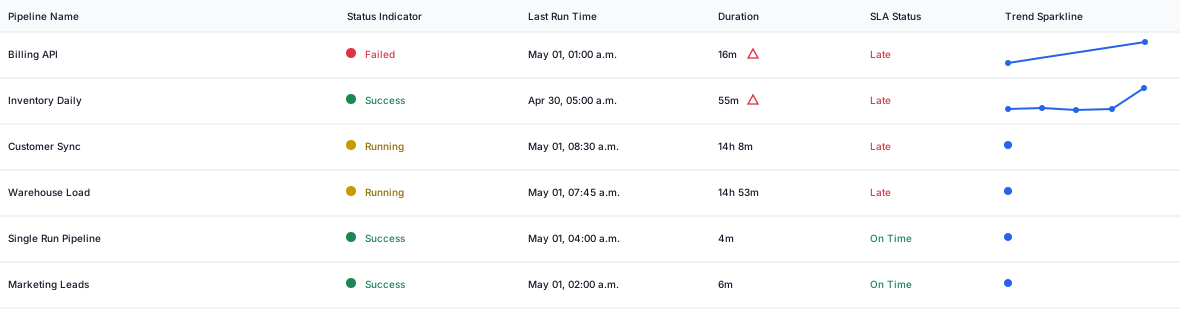
Pipeline Health Monitor groups raw pipeline run rows by pipeline, identifies the latest run by maximum start time, and shows current status, run duration, optional SLA status, duration trend, and basic anomaly warnings without leaving the Power BI report canvas.
Features
Groups runs by pipeline and identifies the latest run using the maximum Start Time.
Gives Power BI users a current operational signal for each pipeline instead of forcing them to scan raw run logs.
Interprets common success, failure, running, and unknown status values from raw text.
Keeps pipeline health readable even when upstream tools use slightly different status labels.
Shows latest duration and a compact sparkline for the last five runs by duration.
Helps teams see whether a pipeline is slowing down before it becomes a visible reporting issue.
Displays On Time or Late when Expected Completion Time is mapped.
Turns Power BI into a practical surface for monitoring operational reporting commitments.
Flags the latest run when its duration is more than 1.5 times the average prior completed duration.
Surfaces performance drift directly inside reports without requiring a separate monitoring tool.
Deduplicates repeated Run IDs per pipeline before evaluating the latest status and duration.
Reduces noise from duplicate ingestion or repeated updates in pipeline telemetry tables.
Field buckets
Score formula: Latest Duration > Average Prior Completed Duration x 1.5
Pipeline, job, workflow, or process name used to group run history.
Unique run identifier. Duplicate Run IDs are deduplicated per pipeline.
Raw run status text. Matching is case-insensitive and supports partial values such as SUCCESS, FAILED - timeout, and In Progress.
Run start timestamp. Rows without Start Time are ignored.
Run end timestamp. Blank End Time is treated as Running.
Optional SLA timestamp. When omitted, the SLA Status column is hidden.
Controls
How to use
Use cases
Get the visual
Download the free Pipeline Health Monitor package and use the sample pipeline run data to test status, duration, SLA, and anomaly behavior inside Power BI.